Moodle 26-27
  • Home
  • Other Years' Moodles
    2024-2025 2023-2024 2022-2023 2021-2022 2020-2021 2019-2020 2018-2019 2017-2018 2016-2017 2015-2016
  • External links
    Choose... E-Learning Help and Support Self-Service Portal
    Panopto SEAtS Microsoft 365 Webmail
    Extensions
    Library Digital Skills
    Newman website
  • More
Log in
Moodle 26-27
Home Other Years' Moodles Collapse Expand
2024-2025 2023-2024 2022-2023 2021-2022 2020-2021 2019-2020 2018-2019 2017-2018 2016-2017 2015-2016
External links Collapse Expand
Choose... E-Learning Help and Support Self-Service Portal Panopto SEAtS Microsoft 365 Webmail Extensions Library Digital Skills Newman website

Blocks

Library Bites

Advanced Search

Useful Library links

  • Library Homepage
  • A-Z Databases
  • Library Subject Guides
  • Newman Harvard Referencing Guide

Support from your Library

  • Book an appointment
  • Anytime Support: video guides
  • Email the Library

Upcoming workshops

Instagram TikTok
  1. E-Learning Tips and Information
  2. Search

E-Learning Tips and Information

Back

Modules missing from My Courses

If you ever go to your My Courses page on Moodle and discover you are missing module pages, this could be down to a few things.

  • If it is the start of the year, the pages might still be hidden by the tutor. Be patient as they may not be ready to show them yet, or they might appreciate a friendly reminder to show the page.
  • You might not be enrolled on the module. If this is the case, you need to speak to Registry to help you with enrolling on the module.
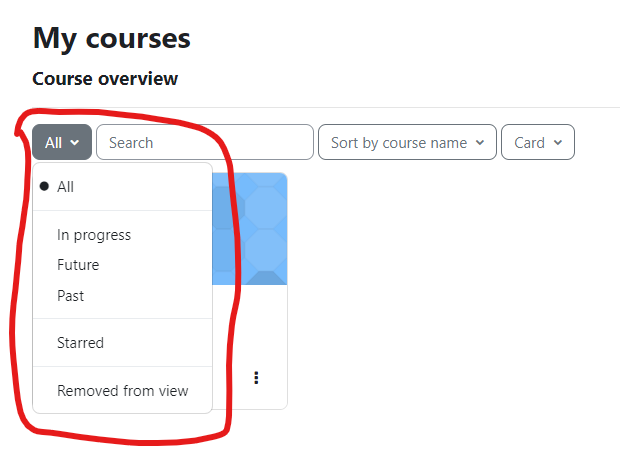
  • You might accidentally have a filter on. There is a filter on the My Courses page, if changed from "All" to any other option, you might find some pages become hidden, change it back to "All" and they should appear again.
    Screenshot showing the My Courses Filter


  • You might be on the wrong Moodle Year. If all the above is how it should be, you might just be on the wrong Moodle Year. You can change this by selecting the Moodle Year you want from the "Other Years' Moodles" tab and then login again.

» E-Learning Tips and Information

Contact site support
You are not logged in. (Log in)
Powered by Moodle